Understanding HubSpot’s Tools: Inbox, Chatbots, and Help Desk
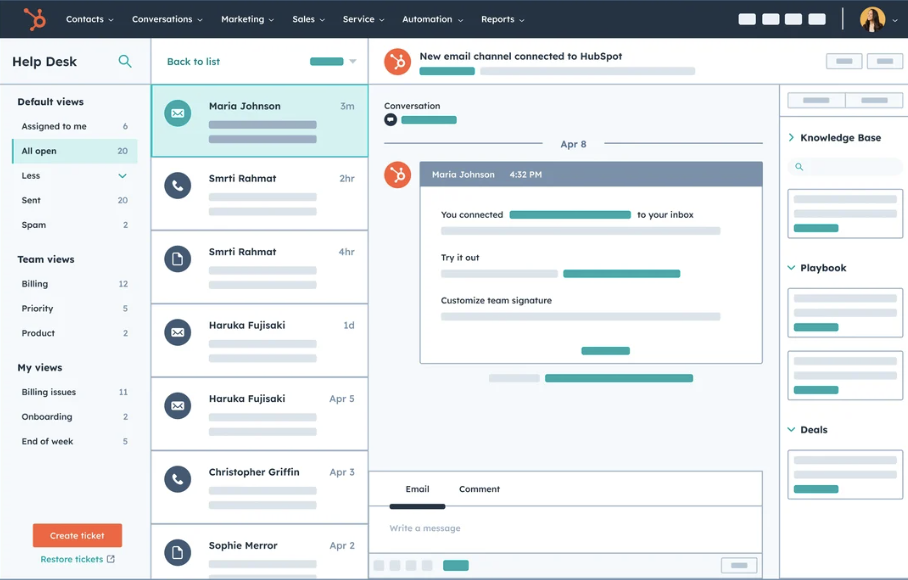
Inbox: Centralizing Conversations
What It Does
The Inbox consolidates all messages from different channels—email, live chat, and social media—into one centralized location.
When to Use It
The Inbox is essential for responding to customer inquiries quickly while keeping track of ongoing conversations. It’s especially useful when multiple team members need to collaborate on customer communication.
How It Helps
- Visibility: All conversations are in one place, reducing the chances of missing a message.
- CRM Integration: Each interaction is linked to the CRM, providing context such as past conversations, customer history, and deal stages.
- Efficiency: Assign messages to specific team members for clarity and accountability.
Chatbots/Chatflows: Automating Engagement
What They Do
Chatbots, or Chatflows, are automated tools designed to answer common customer questions, guide visitors to resources, or collect information to route inquiries to the right team.
When to Use Them
Use chatbots when:
- You want to handle repetitive questions efficiently (e.g., “What are your store hours?”).
- Visitors need quick help without waiting for a live agent.
- You want to qualify leads by collecting essential information upfront.
How They Help
- Time-Saving: Automate responses to reduce the load on your support team.
- 24/7 Availability: Offer help even when your team is offline.
- Escalation: Seamlessly hand off conversations to the Inbox if human intervention is required.
RevOps Assessment in Blog Ad
Help Desk: Managing Customer Issues
What It Does
The Help Desk organizes customer problems through tickets, which track issues from submission to resolution.
When to Use It
The Help Desk is ideal for complex customer problems that need long-term tracking and resolution. For example:
- Handling technical issues.
- Following up on service requests.
- Managing escalations that require coordination across departments.
How It Helps
- Transparency: Teams can see the progress of a ticket at any stage.
- Collaboration: Multiple team members can contribute to resolving the issue.
- Customer Satisfaction: Ensures no problem is left unresolved.
How These Tools Work Together
A Seamless Customer Journey
- Start with Chatbots A customer visits your website and interacts with a chatbot for quick answers. The chatbot identifies whether it can handle the request or if human support is needed.
- Transition to the Inbox If the chatbot escalates the query, it’s routed to the Inbox, where your team can step in. The Inbox ensures real-time communication and enables the team to address the customer’s needs effectively.
- Use the Help Desk for Complex Issues If the issue requires detailed tracking, the team creates a ticket in the Help Desk. The ticket tracks the problem until it’s resolved, keeping everyone informed along the way.
Benefits of an Integrated Workflow
- Efficiency: Automation through chatbots handles routine tasks, freeing up your team to focus on complex problems.
- Clarity: Centralized communication in the Inbox reduces confusion and ensures smooth handoffs.
- Accountability: The Help Desk provides a clear path for problem resolution, boosting customer trust.
Conclusion
HubSpot’s Inbox, Chatbots, and Help Desk are indispensable tools for businesses aiming to provide exceptional customer service. By using these tools in tandem, you can create a seamless, efficient, and satisfying experience for your customers. Whether automating simple tasks with chatbots, managing conversations in the Inbox, or tracking resolutions with the Help Desk, these tools empower your team to stay on top of customer needs.
Start leveraging these tools today to enhance communication, boost productivity, and deliver unparalleled support
Keep reading

Oct 13, 2026
Software in a Service: Taking Responsibility for What Happens Next
An integration fails on a Tuesday morning. Website inquiries stop reaching the CRM. Nobody notices until a customer calls to ask why no one got back to them.

Feb 03, 2026
What HubSpot Admins Should Focus on in Q1
Q1 is when HubSpot Admins lock the decisions that keep Q2 (and the rest of the year!) from turning into damage control. This is the time to decide what the system will do, who owns what, and how you’ll measure success.

Nov 07, 2025
The Simple Guide to HubSpot Agency Onboarding
You already know that HubSpot is the best tool to run your business smoothly and help it grow. You’re ready to get started with implementing best practices, but where to begin?