INBOUND '23: Everything You Need To Know About Commerce Hub
What Is Commerce Hub
Like all of HubSpot’s products, Commerce Hub was built with three specific goals in mind for B2B organizations: speed up payment times, increase revenue, and save time. Let’s take a look at what features are going to accomplish this:
Get Paid Faster
Go from quote to cash faster with better processes and new features like:
- [New] Invoices: Native invoicing is here! Automate your process with invoice-specific workflows and additional revenue reporting. Stay on top of invoices with overdue invoice tracking and management.
- Payment Links: Remove friction in the payment process by adding links wherever you or your customers need them.
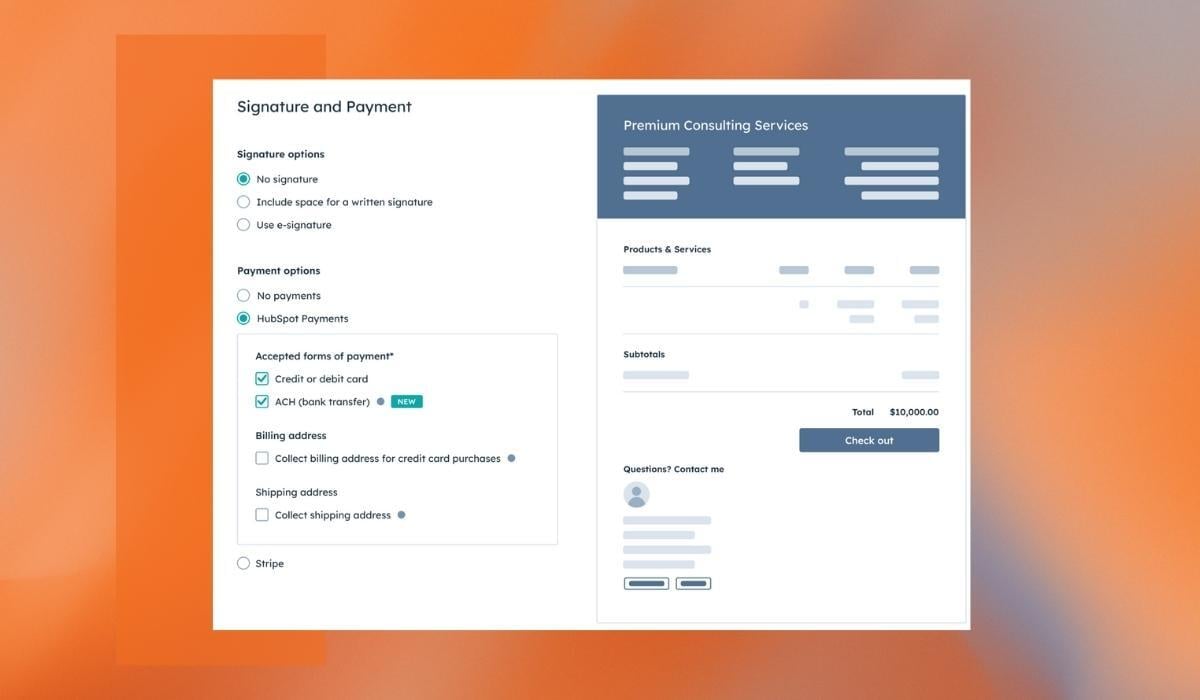
- Quotes: Create, send, and capture signatures on agreements with the option to include payment links.
Increase Revenue
HubSpot has made it easier to collect payments from customers by adding capabilities to their processors and recurring payments including:
- [New] Flexible Payment Processing: In addition to the native HubSpot Payments tool, you can now directly link your existing Stripe account and leverage the full features of Commerce Hub without changing processors.
- Subscriptions: Bill clients for recurring products or services and report and manage subscriptions directly inside of your HubSpot portal.
Save Time
It wouldn’t be a HubSpot hub without some new automation features that add efficiency directly to your portal:
- [ New] Custom Billing Automation: Automate manual tasks that can take a long time to complete each month like subscription management, customer onboarding, renewal management, and more.
- Revenue Reporting: Get the best of both worlds with commerce reporting right alongside your CRM data with custom reports.
How can I get Commerce Hub features?
As of this blog, Commerce Hub will be available for all US-based customers. Some features will be available at the free level with some requiring higher hub tiers. Additional coverage for international users will begin rolling out in the next few quarters (You can join the waitlist here).
While Commerce Hub won’t have any tiers (similar to Ops Hub when it launched) and won’t have a specific subscription, it will have a fee-based structure that only charges you while you use it.
Here’s the example HubSpot provides:
“For example, for a $1,000 credit card payment using Commerce Hub:If you take payment through HubSpot payments, you would pay us a fee of $29.
If you take payment through the Stripe Integration, you would pay us $10 in fees in addition to your Stripe processing rate.”
What’s included in the free tier?
HubSpot has published that the following items will be included in all HubSpot subscriptions, including the free tier:
- Invoices
- Payment links
- Quotes
- Subscriptions
- B2B checkout
- Product Library
- Stripe payment processing integration
What features come with a higher-tier subscription?
Here’s what we know about the features included at specific higher tiers:
- E-signature (requires Sales Hub Starter or above)
- HubSpot payment processing (currently available to US-based companies, requires a Starter or above of any Hub, and application approval)
- Custom billing automation (requires a Professional subscription to Marketing Hub, Sales Hub, or Service Hub)
- Simple revenue reporting (requires a Starter or above subscription of any Hub)
- Custom revenue reporting (requires a Professional or above subscription of any Hub)
As of right now, the Commerce Hub page is live, and the HubSpot Product Service Catalog has been updated if you want to dive right into to details.
Launched in September 2021, many HubSpot users weren’t aware of the commerce-specific tools (like payment links and quotes) and it required a full switch to the native HubSpot payments to use some of the features, which didn’t work for everyone. This intentional re-packaging (with some INBOUND-worthy upgrades) looks like a big upgrade for HubSpot users.
If you’d like to learn more about any of the specific Commerce Hub features or want guidance on leveraging existing tools, let us know, we’d love to help.
Keep reading

Oct 13, 2026
Software in a Service: Taking Responsibility for What Happens Next
An integration fails on a Tuesday morning. Website inquiries stop reaching the CRM. Nobody notices until a customer calls to ask why no one got back to them.

Feb 03, 2026
What HubSpot Admins Should Focus on in Q1
Q1 is when HubSpot Admins lock the decisions that keep Q2 (and the rest of the year!) from turning into damage control. This is the time to decide what the system will do, who owns what, and how you’ll measure success.

Nov 07, 2025
The Simple Guide to HubSpot Agency Onboarding
You already know that HubSpot is the best tool to run your business smoothly and help it grow. You’re ready to get started with implementing best practices, but where to begin?