crmhubspotbridgerevcustom-integrationsrevops
How to Integrate Your CRM with the Rest of Your Tech Stack

Why CRM Integrations Matter
A CRM should serve as the central hub for all customer interactions, ensuring that data flows seamlessly between teams. When systems operate in silos, businesses face challenges such as:
- Incomplete customer data, leading to disjointed sales and service experiences.
- Manual data entry, increasing errors and inefficiencies.
- Misaligned teams, where marketing, sales, and service operate on different information.
A well-integrated CRM:
- Provides a 360-degree view of customer interactions across all touchpoints.
- Automates workflows to reduce administrative tasks and improve efficiency.
- Enhances decision-making by consolidating insights into a single platform.
HubSpot’s Enterprise Suite eliminates the need for patchwork integrations by offering a unified system for marketing, sales, customer service, and operations—all built on a Smart CRM foundation.
1. Using HubSpot Enterprise as Your All-in-One Solution
Many businesses rely on multiple platforms for marketing automation, sales enablement, customer support, and reporting. However, managing separate systems can create inefficiencies and data inconsistencies.
How HubSpot Enterprise Solves This Problem
HubSpot’s Enterprise Suite consolidates all business functions into a single, connected ecosystem, reducing the need for third-party tools.
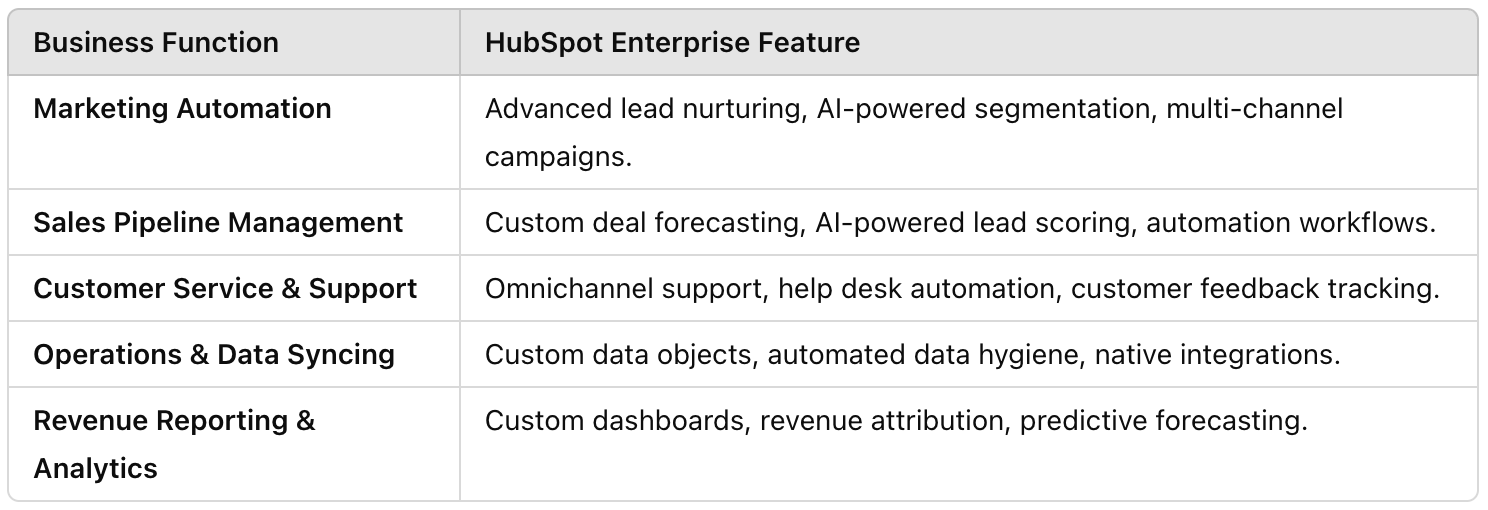
With HubSpot’s Enterprise Suite, businesses can reduce reliance on third-party software while ensuring that all teams work from the same, real-time data.
2. Essential HubSpot Integrations for Expanding Functionality
While HubSpot Enterprise provides an all-in-one solution, certain businesses may need to connect with external platforms for specialized functions. HubSpot’s extensive integration library allows seamless connections with over 1,500+ apps.
Key HubSpot Integrations That Enhance CRM Performance Sales & CRM Integrations
- Salesforce – Syncs HubSpot with Salesforce for bidirectional data sharing.
- Gong – AI-powered conversation intelligence to analyze sales calls.
- LinkedIn Sales Navigator – Helps sales reps engage with prospects directly from HubSpot.
Marketing & Automation Integrations
- Google Ads & Facebook Ads – Connects ad performance data with CRM contacts.
- Drift & Intercom – Enables real-time chat and AI-powered conversations.
- Zapier – Automates workflows between HubSpot and thousands of other apps.
Customer Service & Collaboration Integrations
- Slack – Sends CRM updates and notifications directly to teams.
- Zoom – Logs meeting details and customer interactions in HubSpot.
- Asana & Trello – Syncs tasks and projects with CRM workflows.
Although these integrations extend HubSpot’s capabilities, many businesses find that HubSpot Enterprise can replace multiple third-party tools—simplifying their tech stack while maintaining the highest level of automation and efficiency.

3. How to Ensure Seamless Data Syncing Across Your Tech Stack
Whether you use HubSpot as your primary business system or integrate it with existing tools, maintaining data consistency is critical.
Best Practices for CRM Data Syncing
Use HubSpot’s Operations Hub for Native Data Syncing
- Ensures real-time, bidirectional sync with other business tools.
- Prevents duplicate records and maintains clean data.
- Automates field mapping to align properties across platforms.
Standardize Data Fields Across All Systems
- Ensure consistent naming conventions for contacts, companies, and deals.
- Align lead statuses and deal stages between HubSpot and external platforms.
Automate Workflows to Eliminate Manual Entry
- Set up HubSpot workflows to trigger actions across integrated apps.
- Use Zapier or native HubSpot integrations to move data between platforms automatically.
A fully connected CRM ensures that every department operates from the same, real-time insights—improving efficiency and collaboration.
4. Transitioning to a HubSpot-Centric Tech Stack
For businesses looking to reduce tech stack complexity and increase efficiency, consolidating systems within HubSpot Enterprise is a strategic move.
Steps to Transition to a Fully HubSpot-Integrated System
Audit Your Current Tech Stack
- Identify which platforms overlap with HubSpot’s capabilities.
- Determine which external tools can be replaced by HubSpot’s native features.
Migrate Data and Automate Syncing
- Use HubSpot’s Data Import Tool to migrate contacts, deals, and historical data.
- Enable Operations Hub’s data sync to maintain real-time data consistency.
Train Teams on HubSpot’s Full Capabilities
- Provide role-specific HubSpot training to ensure smooth adoption.
- Set up custom dashboards for marketing, sales, and service teams.
Monitor and Optimize Workflows
- Use HubSpot’s reporting tools to measure efficiency improvements.
- Adjust workflows and automation rules based on team feedback.
By fully leveraging HubSpot’s Enterprise Suite, businesses can create a streamlined, high-performance ecosystem that eliminates inefficiencies caused by disconnected tools.
Final Thoughts
A fully integrated CRM is critical for businesses that want to streamline operations, eliminate silos, and improve customer experiences. While third-party integrations with Salesforce, Slack, and Zapier can enhance functionality, the real power of HubSpot’s Enterprise Suite is its ability to replace multiple tools with a single, connected platform.
By consolidating marketing, sales, customer service, and operations into HubSpot, businesses can achieve:
- A unified customer view with real-time data synchronization.
- Greater automation and efficiency by eliminating redundant tools.
- Improved collaboration between teams using a shared CRM.
Looking for more ways to optimize your CRM?
- Check out our Best Practices for CRM User Adoption guide to ensure your team embraces these integrations wholeheartedly.
- Check out Systems Integrations for more from our CEO.
Keep reading

Oct 13, 2026
Software in a Service: Taking Responsibility for What Happens Next
An integration fails on a Tuesday morning. Website inquiries stop reaching the CRM. Nobody notices until a customer calls to ask why no one got back to them.

Feb 03, 2026
What HubSpot Admins Should Focus on in Q1
Q1 is when HubSpot Admins lock the decisions that keep Q2 (and the rest of the year!) from turning into damage control. This is the time to decide what the system will do, who owns what, and how you’ll measure success.

Nov 07, 2025
The Simple Guide to HubSpot Agency Onboarding
You already know that HubSpot is the best tool to run your business smoothly and help it grow. You’re ready to get started with implementing best practices, but where to begin?